Price History
min
max
fix

Behoof


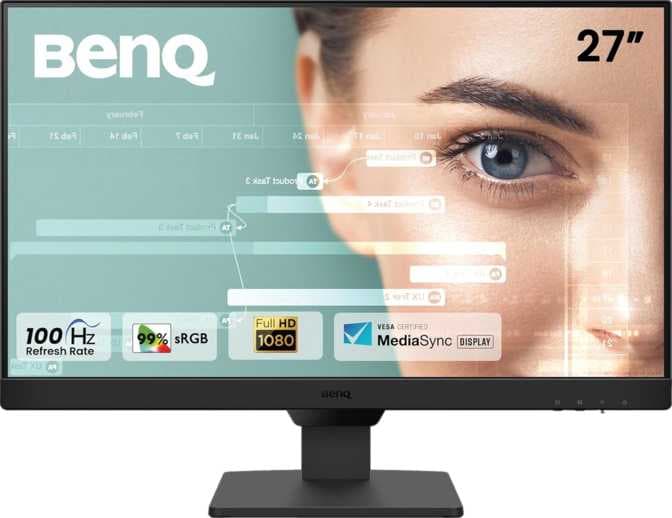
Display
Color rendering
Connectivity
Features
Design
Screen size27 "
The BENQ GW2790 is a 27-inch standard monitor designed for general-purpose use. It features an IPS LCD panel with LED backlighting, offering a basic visual experience with a refresh rate of up to 100 Hz. The monitor displays 16.7 million colors and has a pixel density of 82 pixels per inch, suitable for everyday computing tasks where high-definition detail is not a primary concern.
Despite the inclusion of stereo speakers for basic audio output, the GW2790 has limited connectivity options, which may affect compatibility with certain devices. Color rendering and additional features are minimal, reflecting its focus on simplicity rather than performance or customization. This monitor may be suitable for users needing a straightforward display for routine activities.
min
max
fix
Free delivery
Min
Max
Fix
Free delivery
Min
Max
Fix
Free delivery
Min
Max
Fix
RAJEEV
Good monitor. Eye care technology is good for watching at different light level. Picture clarity is good. Speaker sound is good. 16 A power cord is the drawbacks. Easy to assemble.
Manikandan Raj
Decent one with good quality output. It has built in speakers good enough to hear sound if you are in a silent room. The speakers cannot be relied upon if you are working in a noisy environment. It also has e-paper mode, which is good if you work more on MS Word or if you read story online. Value for the money paid, you can definitely go for it. The monitor has a proximity sensor in front that detects human presence and keeps the monitor screen active. Overall its a good purchase.
RG
The product is not usable at all. The power cable is 16A and won't go in regular sockets. You may have to work in kitchen where you plug appliances or you should plug this monitor in Bathroom where you have plugged the geyser. Amazon doesn't provide return for this item. And you won't get service replacement from brand as the monitor might not be damaged. this is the worst product I have ever bought from Amazon. Totally disappointed. Rs.10000 wasted successfully. LG is the King!
Abhishek
I bought this monitor a week ago, mainly for programming purposes, and so far, I'm pretty impressed. I upgraded from a 21.5-inch AOC monitor, and the jump in screen size has significantly improved my workflow. The 24-inch display allows me to sit at a comfortable distance, which has been great for both ergonomics and reducing eye strain during long coding sessions. The monitor comes with helpful software that lets you control brightness and other display settings directly from your computer, rather than relying on the external buttons — a small but valuable convenience. That said, if you're expecting OLED-level screen quality like what you’d find on some high-end phones or MacBook displays, you might be a bit disappointed. For example, when I use Visual Studio Code, I usually zoom in twice to make the fonts clearly visible. But given the screen size, that's not a major issue for me, and I’ve gotten used to it over time. Video quality and Full HD resolution are solid, and other font sizes and general UI elements render just fine. As with most monitors, you naturally adjust to the display as you use it more often. One thing worth noting — and this is something I saw mentioned in other reviews as well — is that you’ll need a 16A (16 ampere) plug to connect the monitor to a power source. It’s a small but important detail to be aware of before setup. Overall, this monitor offers great value for the price. It's feature-rich, well-suited for coding, and delivers a smooth experience once you're used to it.
ivignesh
The BenQ GW2790 delivers great performance for its price! Sharp and vibrant display with IPS panel – ideal for work and media. Eye-care tech like low blue light and flicker-free screens helps during long hours. Clean, minimal design with thin bezels adds a modern look to your setup. Built-in speakers are a handy bonus for casual use. 🧠 Good to know: The included power cord is a 16A 3-pin type—commonly used for heavy appliances like washing machines—so you’ll need a converter for regular 6A wall sockets. This is not a flaw, but it's worth noting before setup. Overall, a solid, stylish monitor with great comfort and display quality! 👌
Jagadish
I recently purchased the BenQ GW2790 27" monitor during the Republic Day sale for ₹10,000, and I must say, it's a great value-for-money option for work, coding, and general use. Pros: ✅ Eye-Care Features: The Coding Mode is a lifesaver for programmers like me who spend long hours in front of the screen. It enhances text clarity, making code easier to read. The Brightness Intelligence (B.I.) Gen 2 automatically adjusts brightness based on the environment, reducing eye strain. ✅ Good Color & Display Quality: The IPS panel ensures decent color accuracy and viewing angles. For everyday tasks, office work, and entertainment, the display does a great job. ✅ Minimal & Elegant Design: The monitor has thin bezels and a sleek build, making it perfect for a clean desk setup. Cons: ❌ Adapter Issue: The included power adapter does not fit standard Indian plug points, so you need to buy a separate adapter, which is inconvenient. ❌ Not Ideal for Hardcore Gamers: Since this is a 27-inch monitor with 1920x1080p resolution, the pixel density (PPI) isn't great. Text and visuals can feel slightly stretched out. If you're a serious gamer, I recommend going for the 24-inch variant for better sharpness and clarity. Final Verdict: If you're looking for a comfortable and eye-friendly monitor for work, coding, and general use, the BenQ GW2790 is an excellent choice. However, gamers and those who need sharper visuals should consider a 24-inch model instead. Would I recommend it? Yes, but with the above considerations in mind!
Aditya Narayan
The whisper-like maximum volume will disappoint you. Also, when you go to the BenQ website, you will not see GW2490 listed, so you must use some jugaad and download the eye care software. Overall, this is good for under 8K. I'm not complaining, but I will purchase only next time after checking with the official website.
Avik
I use 2pcs with 4 monitors this would be a replacement for one of my dead monitor. BenQ would be my first brand i purchased in monitor segment, This is the first time i saw a brand care so much authentically about packaging, the monitor came in solid thicc thermocol which is nice and i having so many monitors all these years i feel i should compliment on the packaging cause this reduces useless headache factors like replacement for damages on delivery/shipping, pretty good👍 packaging gives you confidence to buy from the brand. Quality is solid and design is simple no silly extra showoff stupid design, gets your daily job done without problems, i bought this cause i was searching for something reliable that lasts long with daily long time casual use, this meets that requirements. pros: +Accurate price of 8k +Sturdy Build Quality (i bought BenQ based on this) +Simple design +Vesa support +Display Colors are ok but depth may need tinkering to calibrate properly. +can easily switch between 2 pc +casual gaming ok +No dead pixel. +IPS backlight bleed not noticeable to almost non existent (i have one area on top however its not noticble unless i sit really close) +hmdi cable,3pin adapter +One Cool Silent feature this monitor has is "Brightness Intelligence Gen 2 (B.I. Gen2)" its a sensor build under the monitor of the BenQ GW series i think, what it does is basically adjusts bluelight brightness based on ambient lighting condition of the room, the feature is cool if you are reading data for long time in a dark room, i personally dont use cause i tweak my gpu to control all monitor brightness individually but its useful i suppose. cons: -100hz is not that great but if you are aiming for casual use at 45hz to 75hz might work. (all monitors with 100hz tech is snake oil in all segment, a true 100hz+ would cost 30k atleast) -speakers are not loud but good feature to have in some cases when you dont have headphones around. (i will update review later after few months if need)