Price History
min
max
fix

Behoof



Display
Color rendering
Connectivity
Features
Design
 Best choice


It's better to wait to buy
Item with the highest price in the last 30 days
Screen size32 "
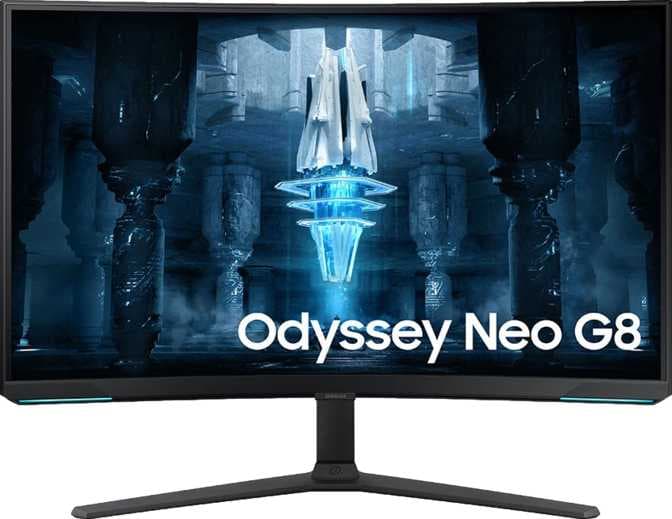
The SAMSUNG ODYSSEY NEO G8 (G85NB) is a 32-inch curved gaming monitor that employs QD-OLED display technology, delivering high brightness and contrast levels suitable for immersive visual experiences. With a pixel density of 137 pixels per inch and a refresh rate of 240 Hz, it supports smooth motion rendering, which is particularly helpful for high-speed gaming scenarios. The screen supports up to 1.07 billion displayable colors, ensuring a wide range of tones and hues, though the color rendering accuracy is rated as very poor, which may impact professional visual work. Despite its advanced panel type, the monitor lacks built-in stereo speakers and has limited connectivity and features.
In summary, the SAMSUNG ODYSSEY NEO G8 (G85NB) is a high-refresh-rate 32" curved QD-OLED monitor designed for gamers who prioritize refresh speed and display immersion over color precision, connectivity, and multimedia features.
min
max
fix
Free delivery
Min
Max
Fix
Monitors
Price
Monitors
Price
Monitors
Price

Kenny
After many calls with the customer and the service center I got assigned and esscaIations I got the panel replaced. Dealing with Samsungs customer care was difficult but in the end they were able to resolve the issue and hopefully everything works as it should from now on. I've been using the monitor for two days now, image quality in sdr and hdr is astoundingly good. Although be warned that on windows 11 at launch the colors are gonna look washed out especially if you run a multi-monitor setup. Increasing the contrast to 60% in Nvidia's control panel, turning on contrast enhancer on the monitors menu and setting the gamma mode to 3 fixed the problem. I believe this is a problem with windows rather than the monitors. The colors are also not quite accurate and there are only guides that can help calibrate the monitor. Once everything is setup this is hands down one of the best HDR experiences you can have, the only thing better than this would be an actual OLED monitor but this is astonishingly close.
QWsf
A great and beautiful monitor with scan lines in some cases. I loved the mini leds. So decided to go for this even with scan lines. As I learned no monitor is perfect. I can see scan lines only with Mac book and using type c to hdmi converter. If I use windows machine with display cable there are no scan lines. Im primarily using this for 8 - 10 hours of programming and Im loving its curve. Earlier I have returned LG 32UN880B and Samsung M8. Their corners were very difficult to reach, no matter where you sit. It is very convenient to use curved monitor if screen size is 32 inch. So if anyone looking for 32 inch monitor curve should be first priority. Autoswitch only works when monitor not in stand by.
Nandan Banerjee
Great Monitor I have ever used. My model is odyssey G7 32 inch WQHD 240 hz. In one word big and beautiful. 1) I also have Acer Predator 27 inch WQHD 144hz IPS monitor which is great for color production, For a VA pannel I thought it will not be so colorful and backlit bleed will be more. but I totally surprised for the model I have got . It competes Neck to neck with premium IPS pannel in color reproduction and backlit bleed not present at all. 2) With WQHD 240 hz, it is the fastest fluid monitor I have ever used. 2ms response time WOW , I play Valorant regularly and this runs amazing. 3) I attach it with my ASUS ROG Strix G17 with RTX 3060 and R9 5900HX and getting 260 fps in fhd setting in valorant. 4) It comes with DP to DP cable which is useful when I connect it with my Desktop. As I stay far from my home for work , I have to use my laptop so this cable didnt worked for me and I have to purchase a USB C to DP cable seperately for 240 hz to work. 5) It also does not come with HDMI cable which is a bummer, I also purchased it seperately althogh HDMI gives only 144hz refresh rate. 6) The HDMI port is 2.0 not 2.1 in the monitor. 7) No speaker present, I have to use my headphone, During gameplay its ok but during watching movie its annoying. I am using Galaxy buds pro. 8) It also have 3.5mm headphone jack but sound output is inferior than ROG Strix laptop. 9) RGB lighting is ok , but front is hardly visible and back is ok. You can change it to static to rainbow to flash. 10) Stand is very good sturdy and can move the monitor in any direction. Hinge is so perfect. Wall mount also possible, accessories are given. Overall great monitor for gaming and watching movies but 1000R curve is polarizing, I feel good with the curve. Its depends upon personal preferences. Got it in 45999 INR which is bonkus Thanks to Amazon and Appario Retail for delivering this in proper time and in perfect condition. Foot Note: what I totally missed to notice that The monitor G7 32 inch came in Amazon packing box. Not in the Samsung company sealed box, Now I am in doubt wheather its a refurbished/ repackaged one? Thogh its working good .Seller please respond.
Yuvraj Singh
Samsung Odyssey G7 is a great monitor for both gaming and watching movies and tv series. PROS: 👍 1. 240hz 2. 1440p resolution 3. Gsync compatible 4. VA panel (deep blacks are great) 5. curved monitor, so you don't have to turn your head too much while sitting close. (no it doesn't feel too curved just right at the point) 6. core lighting, puts less stress on your eyes in dark. 7. the pixel density is about 109 PPI so it's obvious the text clarity will be good as well 8. comes with two 3.0 USB slots, so you can plug your mouse and keyboard. 9. It comes with HDR 600. movies, games, and series look great watching on HDR. CONS: 😌 1. gets hot easily when HDR is on, you can feel the heat on your face, but having an ac room should fix that issue. 2. THE PORTS ARE A NIGHTMARE TO REACH !! they are so hard to access, if you don't have a big table you'll struggle to find ports just by the feel of hands. what makes it super hard is they are not visible from the back or can be felt with a hand easily. 3. Just HDR 600, HDR 600 isn't great but better than the fake HDR 400 certified monitors. 4. core lighting isn't bright enough with half of the available colors so make sure to choose the bright color. 5. most importantly, the stand is huge which might not an issue for big tables. i suggest a gas-powered VESA mount. 6. Vulcan and HDR aren't compatible for some reason, your monitor will go blank and won't start without replugging the power cord. EXTRA: no dead pixel or any sort of faults in my unit, Bought it for 43500rs